Can You Vibe Code a 3D Configurator? We Tested It
Yes, you can vibe code a 3D configurator, but mainly as a prototype. We tested GPT-6 Astra on a real table configurator: here's what AI built well, and where the product logic broke.
 Camille Felappi
The short answer is yes, you can vibe code a 3D configurator yourself, but mainly as a prototype. AI models such as GPT-6 Astra and Claude Opus 5.5 can build a 3D configurator with option switching, material swaps and camera controls. What they can't reliably build is the production layer: interdependent product rules, pricing connected to your price list, and validated manufacturing outputs like BOMs and CAD files.
Key takeaways from our test:
- AI now does the 3D setup fast, and does it well. With GPT-6 Astra, the 3D setup took about an hour instead of days, and the 3D quality was the best of any AI model we've tested.
- AI gets product rules wrong without showing it. When one option depended on another, the AI often got the rule wrong. The product looked fine on screen, but it couldn't be built.
- The 80/20 rule applies. You can get impressive results after a few prompts. Going from there to a complete, production-ready configurator takes a lot more time, effort and frustration, and that's if the AI model can manage the growing complexity at all.
We build 3D configurators for manufacturers, and AI is part of our own pipeline. So we tested vibe coding against real configurator work to see how far it could go. This article covers what we found, and how to approach it if you sell complex, customizable products.
What Is Vibe Coding, and What Can It Build Today?
Vibe coding means building software by describing what you want to an AI model and using the code it produces, with little or no understanding or manual review of the code. For a 3D configurator, you describe your product, the model builds the 3D scene and the UI, and you see what comes out.
In 2026, AI models gained 3D capabilities that did not exist a year earlier. OpenAI's GPT-6 Astra, released in September 2026, can operate Blender directly: opening menus, building geometry, setting up materials and exporting files. In a demo by Higgsfield, Anthropic's Claude Opus 5.5 modeled a Shinkansen train in Blender from 5,112 separate objects, down to each of its 430 seats. And Meta's Muse Glimmer, an open-weight model released in August 2026, runs on a single consumer GPU.
If you sell configurable products, you may be wondering what this means for you. These tools are new, results vary from model to model, and they still need an experienced person steering them. But they have started to take on parts of configurator work that used to keep a developer and a 3D artist busy for weeks:
- Fast prototyping: you can have a working 3D configurator demo in an afternoon.
- 3D asset generation: impressive 3D scenes and renders from text or reference images, built inside Blender as editable files.
- Simple product configurations: a few colors, sizes or fixed options that update a 3D model in real time.
We Tested GPT-6 Astra on Real 3D Configurator Work
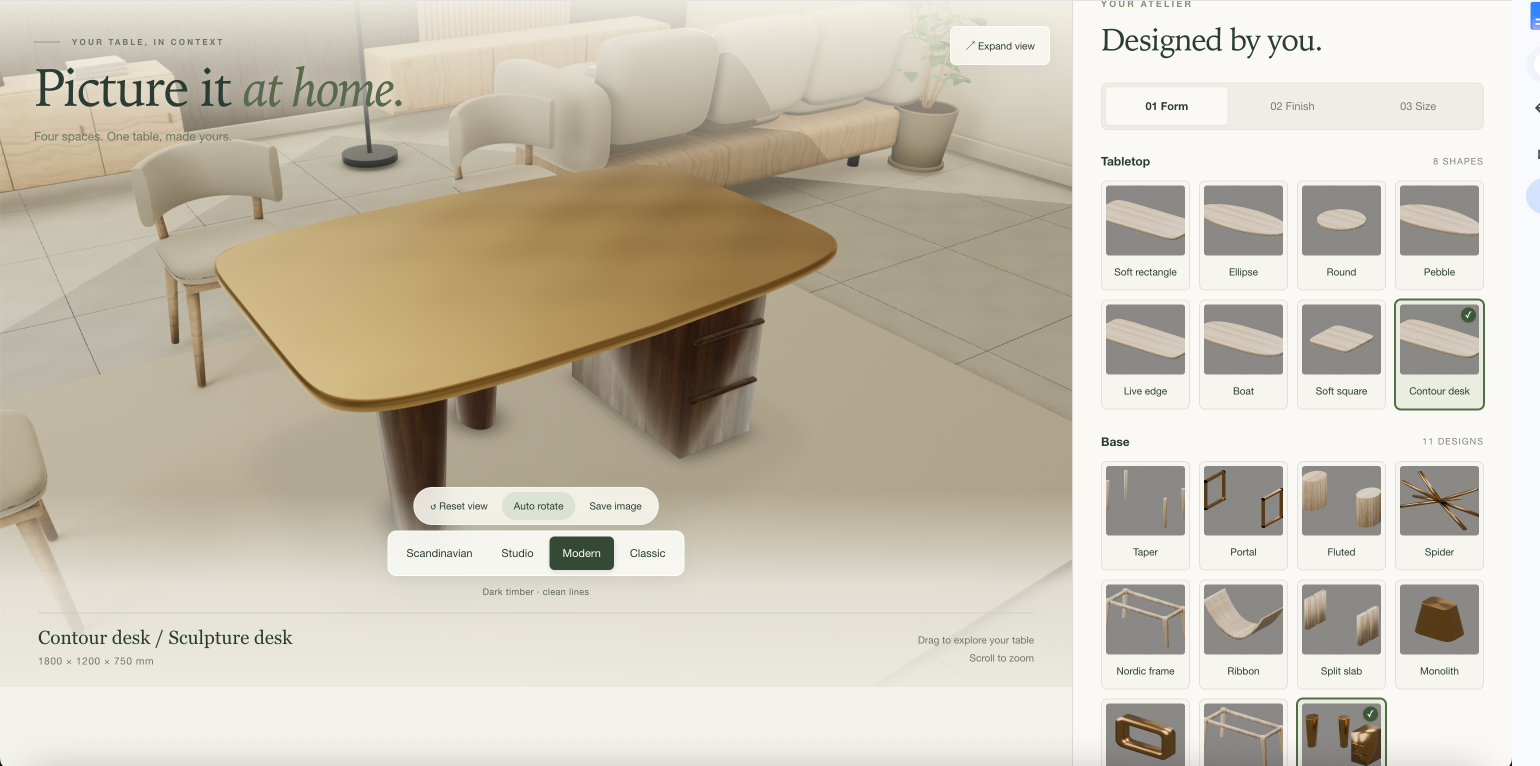
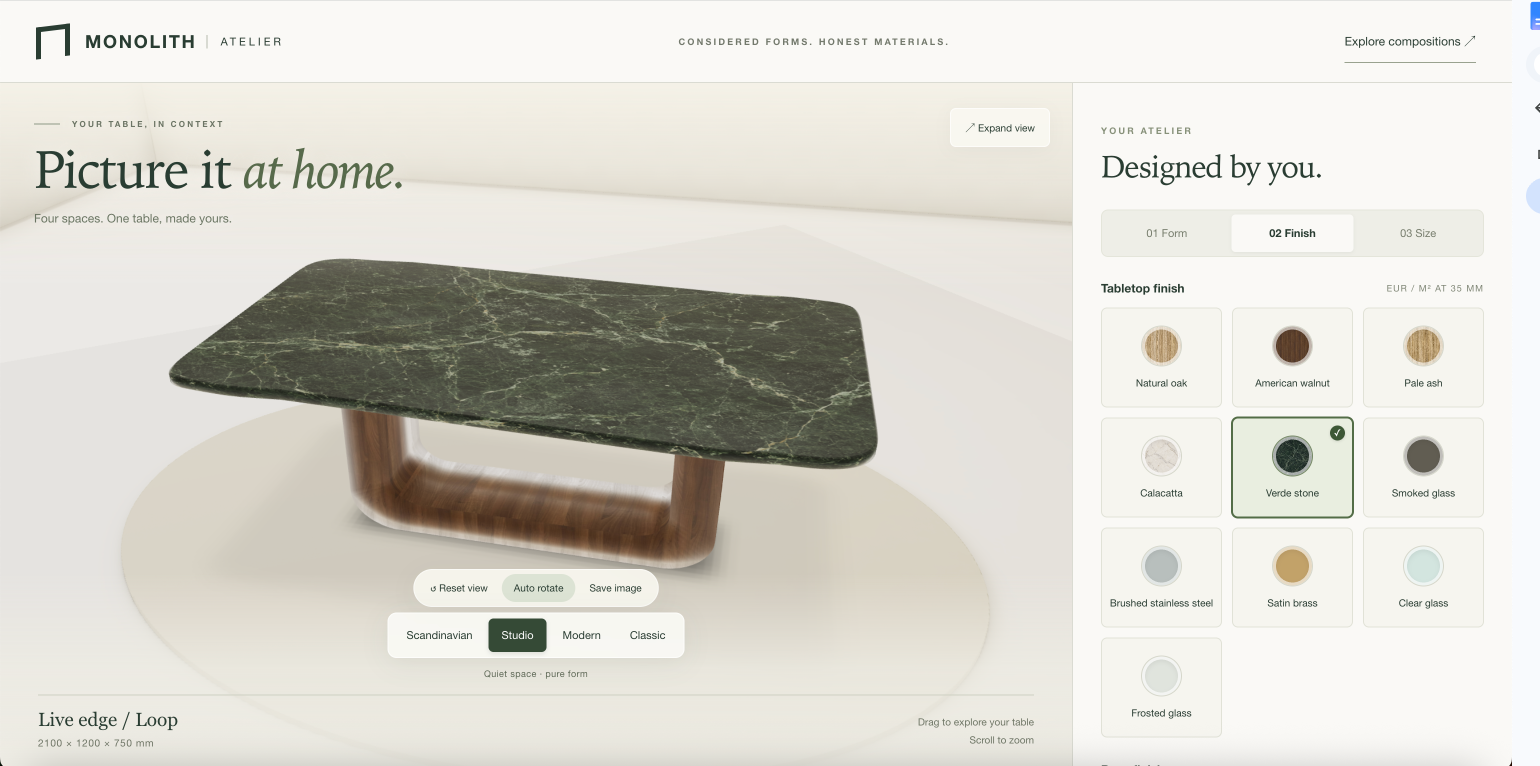
We gave GPT-6 Astra one task: build a 3D configurator for a table. It built the 3D model, set up the shape, finish and size options, added a live price, and placed the table in four room styles buyers can switch between. It handled the 3D setup and rendering fast and well, but got product rules wrong in ways that didn't show on screen.
What Worked: 3D and Rendering
The 3D work was clearly better than anything we had seen from earlier models. Setting up the scene, including lighting, shadows and the different room environments, took an hour instead of days.
The model also showed more visual judgment than its predecessors. Telling it "the lights are too bright" triggered a reasonable adjustment more often than not.
What Broke: Complexity, Completeness and Coherence
The first version worked well. The trouble started when we added room planner features. Every option worked on its own, but once options depended on each other, the AI got the rules wrong. The configurator let buyers create designs that couldn't be built, and the 3D view still looked right.
That is the pattern manufacturers need to watch for. Vibe-coded configurators don't fail because the 3D looks bad. They fail because the rules underneath are wrong, and nothing on screen shows the error.
Then there's everything a prototype leaves out. In production, a submitted configuration has to go somewhere: a lead in your CRM, an order in your e-commerce store, or at the very least an email to your sales team. It also needs a PDF quote, plus prices and stock levels from your ERP. AI can build each of these connections, but making them reliable and secure, and keeping them that way, is a much bigger job.
And the bigger the project got, the less it held together. AI focuses on the task in front of it, not on what the configurator as a whole is meant to do, and it rarely pushes back on a request. Our original flow made sense. Each option, constraint and feature we added worked on its own, but together they made the configurator messy and inconsistent.
Why Do Vibe-Coded 3D Configurators Fail in Production?
Building your own 3D configurator with AI can work well when the product is mostly visual, like a chair available in six colors. It becomes unreliable when the product is defined by complex rules, like a railing system built to exact dimensions, because most of the work happens in the product logic, pricing and outputs behind the 3D view. And even when the logic holds, a 3D configurator you vibe code yourself leaves your team with a second job: keeping it running.
Vibe-coded configurator vs. configurator platform at a glance:
| Vibe-coded configurator | Configurator platform | |
|---|---|---|
| Product rules | Can look right but be wrong | Validated on every configuration |
| Pricing | Hardcoded or generated by AI | Pulled from your price list or ERP and connected to your catalog in real time |
| Manufacturing outputs | Not validated | Generated from validated configurations |
| Integrations | Built and maintained by your team | Ready-made connectors plus custom integrations |
| Security | Often unreviewed code | Isolated data, logged actions |
| Maintenance | Your team's job | Included |
1. Product Rules That Depend on Each Other
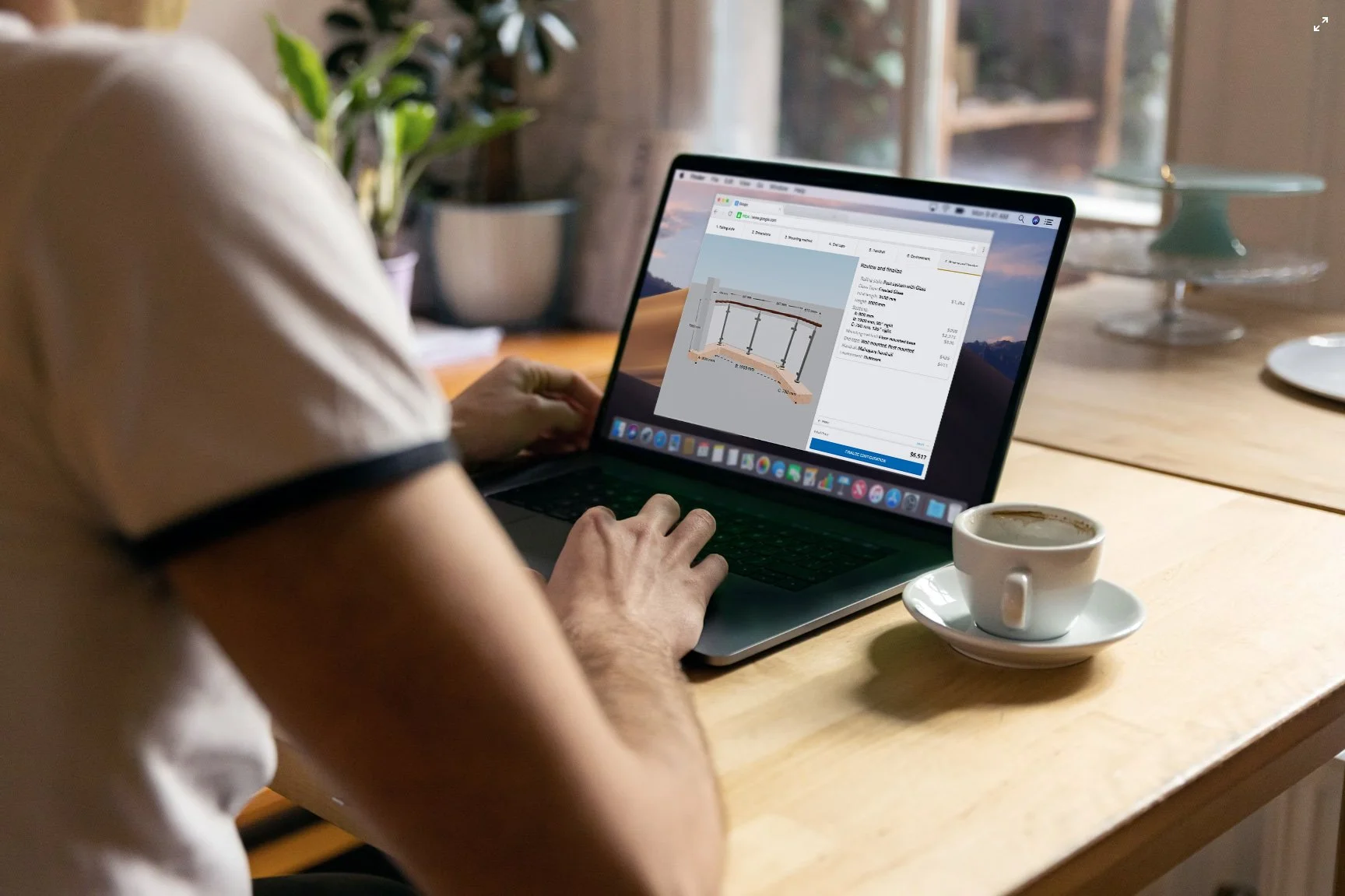
Options in a configurable product don't live on their own. Pick a wider cabinet, and it needs a center divider. Choose a certain post spacing, and glass panels are off the table. The 3D configurator has to know all of this, every time a buyer clicks.
That's where a vibe-coded configurator falls short. It can let a buyer put a 2,400 mm tabletop on a base designed for 1,800 mm, and the 3D view will still show a perfectly good table. A buyer can order that, and your factory will be the first to notice.
A 3D configurator platform works the other way around. You set up your product rules once, including modular structures and advanced constraints, and the configurator only lets buyers build combinations you can actually manufacture.
2. Pricing
Most vibe-coded configurators either hardcode prices or let the model come up with them. Neither is connected to your actual price list. And if the AI shows a buyer a price it invented, you may be held to it.
On a configurator platform, pricing is built in through visual CPQ (configure, price, quote). It's connected to your catalog and recalculates as the buyer changes options, with conditional price rules and multiple currencies. Every price comes from your data.
3. Manufacturing Outputs
Most manufacturers need every configured order to produce the files their factory works from: BOMs, CAD files (STEP, DXF), PDF spec sheets and CNC-ready files.
AI can generate these. But the files are only as good as the configuration they come from. If that configuration breaks one of your rules, so do the files, and you'll usually find out on the shop floor.
A configurator platform generates them from the validated configuration. What the factory gets is what the buyer configured.
4. Integrations With ERP, CRM and E-Commerce
If your 3D configurator needs to integrate with your e-commerce store, CRM or ERP, AI can help you build a first version of those integrations. After that, they're yours, including every bug and every breaking change when one of those systems updates.
Configurator platforms usually come with ready-made connectors for stores like Shopify, WooCommerce and BigCommerce, and support custom integrations with ERP, CRM and PIM systems. Keeping those connections working is the provider's job.
5. Security
Vibe-coded apps get built fast. Built securely is another matter. Missing access rules, exposed customer or pricing data and code nobody has reviewed are common, and teams often spot them only after a leak.
A configurator often holds sensitive data, like customer details and dealer pricing. On a configurator platform, your data is isolated and protected, and every action is logged. The provider handles security, so your team doesn't have to.
6. Maintenance
A vibe-coded configurator is yours to run. You host it and keep an eye on it, and when it breaks, you fix it. Every hour it's down is an hour your buyers can't order. Testing is on you too, on every device and browser after each change.
With a configurator platform, hosting, maintenance and support are part of the service, usually backed by an SLA. The provider tests across devices before each release, and the platform keeps getting new features over time.
You Can Vibe Code a Configurator. But Should You?
So, can you vibe code a 3D configurator yourself? As our test showed, yes, up to a point. AI built the 3D scenes, the configurator code and a working prototype. Where it fell short was the product rules, the part that decides whether an order can actually be built.
The next question is whether you should. The answer depends less on the AI and more on your product and how you sell it. Go through these five questions with your team before you decide:
- Do some of your options depend on each other? For example, a wider cabinet needs a center divider, or a certain post spacing rules out glass infill. AI handles independent options like colors well. When options restrict each other, AI has to get every product rule right.
- Will buyers or dealers place orders through the configurator? If the configurator only shows your products in 3D, a wrong option is easy to fix. Once buyers and dealers order from it, a wrong option or price becomes a real order your sales team has to correct.
- Does the configuration go to your factory or your ERP? If a configured order becomes a sales order in your ERP, or a BOM or CAD file for your factory, any error in the product rules ends up there too.
- Is your pricing complex? Does the price depend on dimensions or on combinations of options, or do dealers pay different prices than end buyers? The more rules you have, the more chances a buyer sees the wrong price in a vibe-coded 3D configurator.
- Does your team have time to maintain it? A vibe-coded configurator has to be hosted, tested after every change and fixed when it breaks, for as long as it's live. That work lands on your team, on top of their actual jobs.
What Happens Next for AI 3D Configurators
GPT-6 Astra isn't the only model that moved things forward this year. Anthropic released Claude Opus 5.5 in September 2026, saying it performs at the level of Claude Fable 5.1 on most work while costing 40% less to run than Opus 5. The market for AI 3D generation is estimated to grow about 31% this year.
3D keeps getting better and cheaper with every release. For product configuration, that means:
- Your products will cost less to bring into 3D. Creating 3D models of a full product catalog used to be one of the biggest costs of a configurator project. In our test, AI cut the 3D setup from days to hours, and that cost will keep dropping.
- Finding out if a configurator fits your product gets cheaper. You can build a rough prototype and show it to your sales team or a few buyers before you commit to a full project.
- Product rules and pricing won't get easier. The progress so far is in 3D and code. Defining which options work together, how prices are calculated and what your factory needs from each order still takes people who know your product.
The manufacturers that benefit most will neither avoid AI nor hand everything to it. They'll use AI where it's strong and pair it with a platform that handles what AI can't: product rules, pricing, manufacturing outputs and integrations.
How We Build 3D Configurators at Salsita
At Salsita, we build 3D configurators for manufacturers with complex and modular products. AI is part of our own process for 3D assets, rendering and prototypes, and we test each new model against real configurator work.
Each project starts with scoping. Before we build anything, we define your product rules, pricing logic and integrations together with your team. We model your product data around how you manufacture, design the buyer flow for customers, dealers and sales teams, and make sure new options can be added later without breaking saved configurations or existing orders. Most first releases go live in 1–2 months.
Already built a prototype with AI? Bring it to a demo, and we'll show you what it takes to get from that prototype to a 3D configurator your buyers, dealers and factory can rely on.
Want to see how this could work for your products?
Book a demoFAQ
Can AI build a 3D product configurator?
Yes. GPT-6 Astra, Claude Opus 5.5, Claude Fable 5.1, Meta's Muse models and other frontier models can build a working 3D configurator prototype in an afternoon. For simple products with limited options, that may be enough. For complex products that need validated rules, live pricing, manufacturing outputs and integrations, a prototype is not the same as a production system.
What is vibe coding?
Vibe coding means building software by describing what you want to an AI model and using the code it produces, with little or no manual review. It's fast for prototypes, but it makes maintenance, testing and security harder over time.
Can I use my AI prototype as a starting point with Salsita?
Yes. A prototype built with AI is a good way to test an idea and get internal buy-in. We can assess what you have built and show you the path from prototype to production.
Does Salsita use AI?
Yes, in two ways. We use AI in our own build process for 3D asset creation, rendering pipelines and prototyping, and our experience tells us where it helps and where it doesn't. We also use it in the product itself. Our AI assistant guides customers through configuration in natural language, constrained by your actual product rules, so every recommendation is something you can manufacture and ship.
How long does it take to implement a production 3D configurator?
With Salsita, most first releases go live in 1–2 months, including a few weeks of scoping product rules, pricing logic and integrations. That scoping is the part a vibe-coded prototype skips, and the reason a properly implemented configurator holds up afterward.
What if I just want to test whether a configurator would work for my product?
Start with an AI prototype. It's a sensible first step, and it costs a fraction of what it did two years ago. If the prototype confirms the opportunity, we can build the production version with you.

Camille Felappi
Camille is a B2B digital marketing specialist, focusing on SEO and content creation. She helps businesses connect with their target audience using data-driven and creative strategies.
Personalized demo with our VP
Stop Losing Deals to Confusing Catalogs
Book a 30-minute call – bring one product, leave with a working 3D configurator prototype and a clear implementation timeline.



Bring one product link – leave with a clear next step.
































Related Articles

What Features Should You Look for in Configurator Software?
Most configurator software evaluations focus on visuals, but ROI comes from the rules engine, pricing logic, and manufacturing outputs. Learn what to test.

7 Best Zakeke Alternatives in 2026
Zakeke is one of the most popular product customization platforms for ecommerce. But popularity does not mean it is the right fit for every business. This guide compares seven alternatives by features, pricing, and trade-offs.

7 Best 3D Configurators for Manufacturing in 2026
We compared 3D configurators for manufacturing based on what actually matters: parametric modeling, multi-user access, ERP connectivity, CPQ, and manufacturing-ready outputs.