What Features Should You Look for in Configurator Software?
Most configurator software evaluations focus on visuals, but ROI comes from the rules engine, pricing logic, and manufacturing outputs. Learn what to test.
 Camille Felappi
Configurator software is a crowded market, and picking the wrong platform is expensive. The license fee is the smallest part of the cost. The bigger part is the months spent on implementation, the 3D assets you've already built, and the internal buy-in you had to get before starting. Switching later costs more than getting it right now.
The problem is that most businesses evaluating product customization software overweight the visual layer: the rendering, the materials, the spin. Those matter, but on their own they won't deliver ROI. The features that decide whether the project pays off, like rules engine depth, integration quality, and whether your team can update the configurator without a developer, get far less attention during evaluations.
In short, look for three things: 3D visuals that stay sharp and fast on a phone, a rules and pricing engine that matches how your product is really built and sold, and integrations that send production-ready data to your ERP and factory floor. This guide covers what to test in each of those layers, and the questions to ask in a demo.
How to Compare Configurator Software: A Three-Layer Framework
On the surface, most product customization software does the same thing: a buyer, dealer, or sales rep picks options and sees the product change. Underneath, the differences are large and easy to miss if you only compare what's on screen.
A useful way to evaluate configurator software is in three layers. Each one serves a different part of your business, and a gap in any one of them creates problems further down the line.
| Layer | What it covers | Who relies on it | What breaks without it |
|---|---|---|---|
| Customer experience | 3D rendering, mobile performance, model interactions, virtual photography | Buyers, dealers | Buyers can't picture the product. Misorders and returns follow. |
| Business logic | Rules engine, parametric models, modular configuration, dynamic pricing / CPQ | Product teams, sales | Quoting takes days. Pricing errors reach customers. |
| Integrations and output | ERP, CRM, e-commerce, BOM and CAD exports, admin panel | Production, IT, order management | Orders require manual re-entry. Your team can't update products without a developer. |
Most platforms are strong in at least one layer. Finding one that covers all three without major gaps is much harder. Below is what to evaluate in each layer and how to test it.
Interactive 3D Configurator Features for the Customer Experience
This layer covers everything the buyer sees and touches. It's the most visible part of any 3D configurator and the easiest to compare.
3D Rendering Quality and Mobile Performance
An interactive 3D configurator should update within milliseconds as users swap materials, colors, or components. Look for a rendering engine that handles realistic materials well: metal that actually looks metallic, fabric with visible texture, wood grain that shifts with the lighting.
But rendering quality on a demo laptop tells you very little. A configurator that looks sharp on a 27-inch monitor but loses texture quality on a phone will disappoint every buyer who shows up on mobile. In Salsita's research, over 50% of companies named real-time 3D visualization as a core requirement, and mobile-first UX came up as a must-have in both construction and e-commerce.
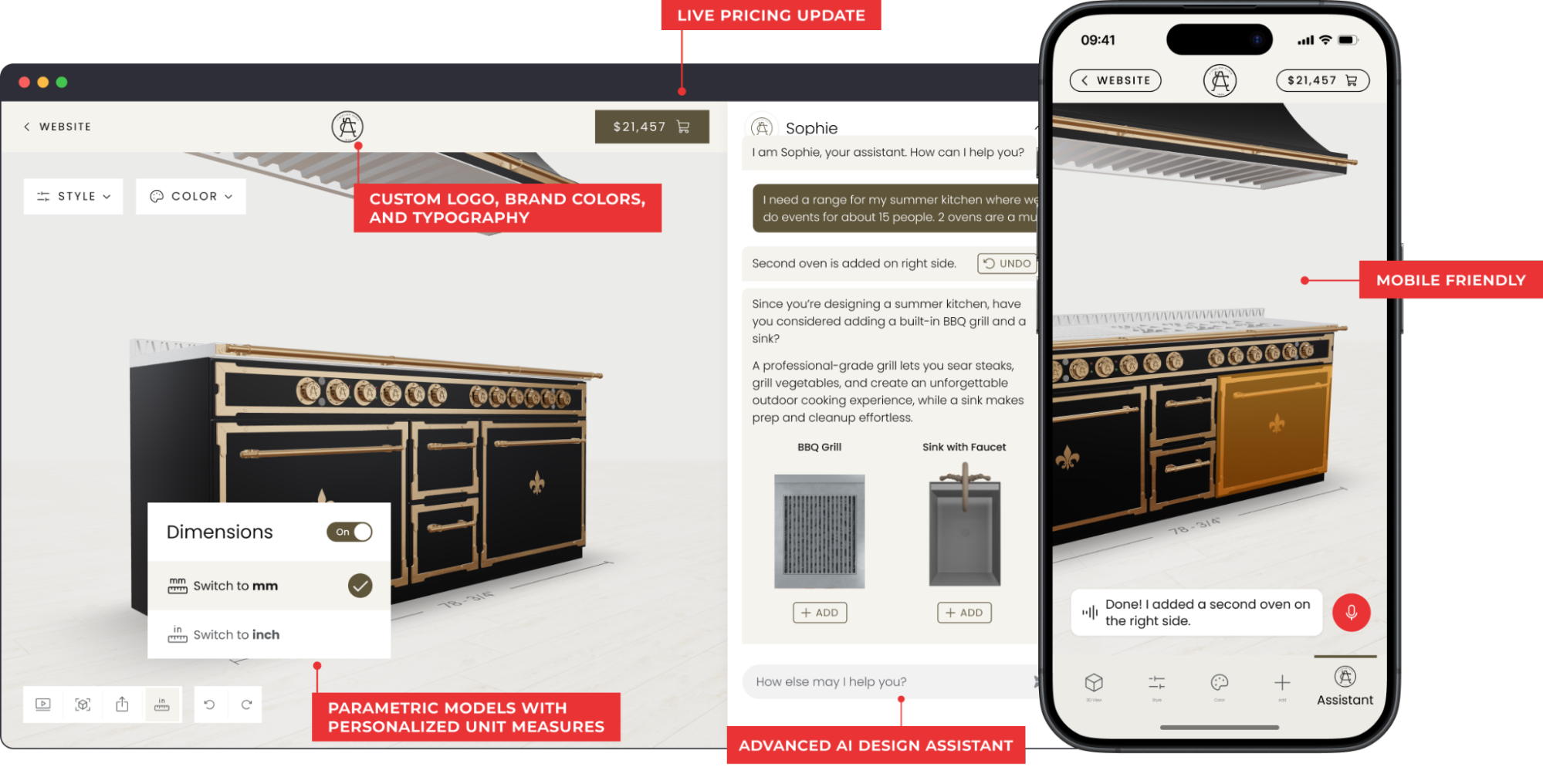
Complexity is where rendering engines separate. A chair with four fabrics is easy. A kitchen with 60 cabinets, custom dimensions, and 200 finishes is a real test. Ask for a demo on something close to your most complex product.
A note on 3D and AI: The bar for 3D quality has shifted fast. Models like GPT-6 Astra and Claude Opus 5.5 can now generate production-grade 3D assets directly, which means getting realistic product models into a configurator is no longer the expensive, months-long bottleneck it used to be. What still requires deep expertise is everything behind the visuals: the product rules, pricing logic, and manufacturing outputs that turn a 3D scene into a system you can actually sell from.
3D Model Interactions
Rotating and zooming is the baseline. 3D model interactions go further: buyers drag components into place, click hotspots to adjust a part or see its details, and every element snaps to a valid position. A buyer planning a shelving wall can grab a shelf, move it, and the configurator enforces the spacing rules automatically.
This matters most for products with multiple components or customization points. Think of a kitchen cabinet configurator where the buyer clicks a door front to swap the handle style, taps a drawer to change the finish, or selects a countertop section to switch materials. Without direct manipulation, these products are difficult to configure through dropdown menus alone.
Virtual Photography
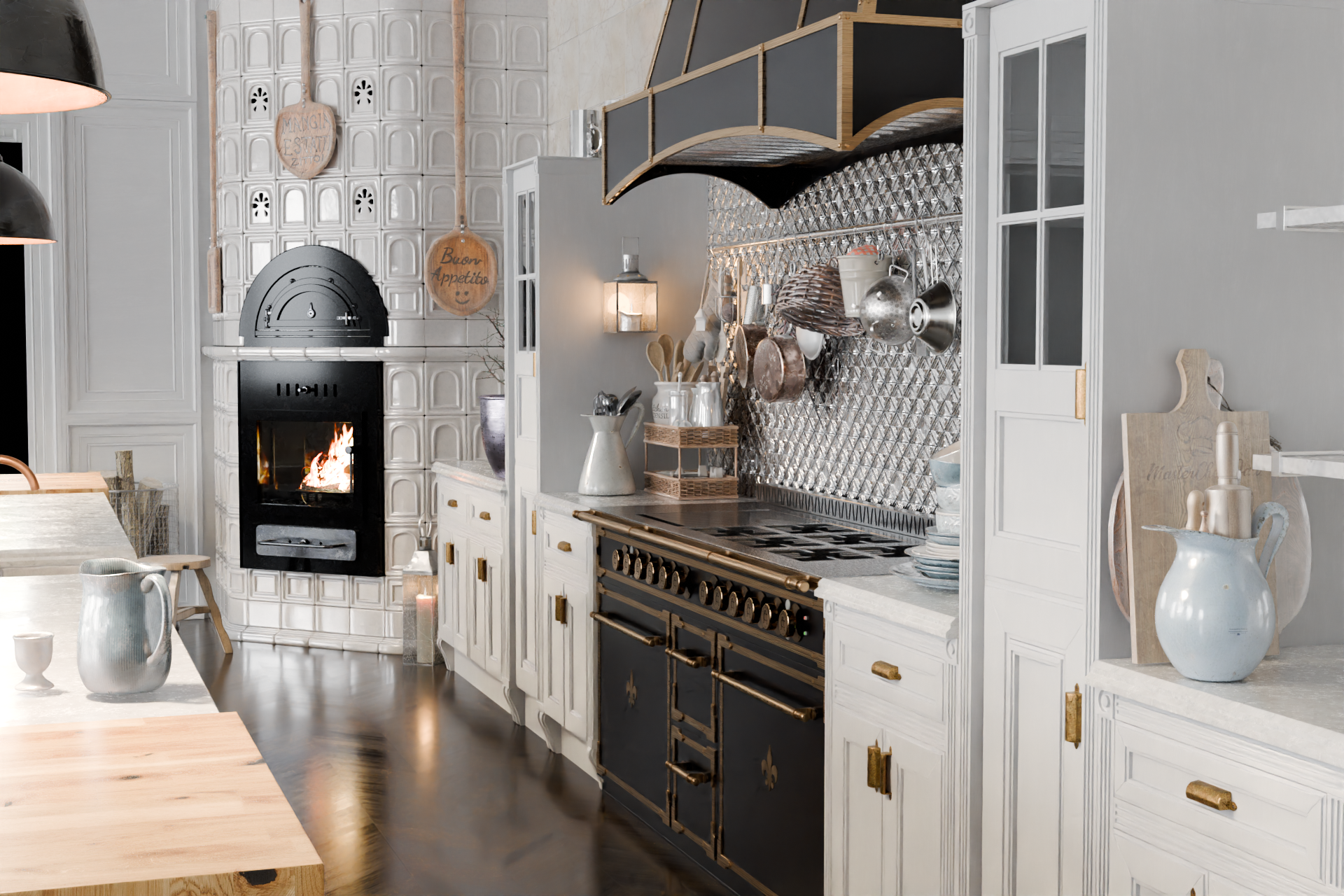
Virtual photography turns any configuration into a photorealistic image. It uses a physically based rendering engine, the same type used in filmmaking, to place the configured product in a realistic setting with accurate lighting, reflections, and shadows.
For B2B manufacturers, these images raise the quality of quotes and proposals, which counts when a buyer is signing off on a large order. If your sales process ends in a proposal or a product page, ask about rendering a finished image from a live configuration.
Business Logic in 3D Configurator Software: The Layer That Drives (or Kills) ROI
Business logic turns the product rules that live in spreadsheets and in your senior staff's heads into rules the configurator applies to every order. It's also the hardest layer to judge in a demo.
Parametric Models for Made-to-Order Products
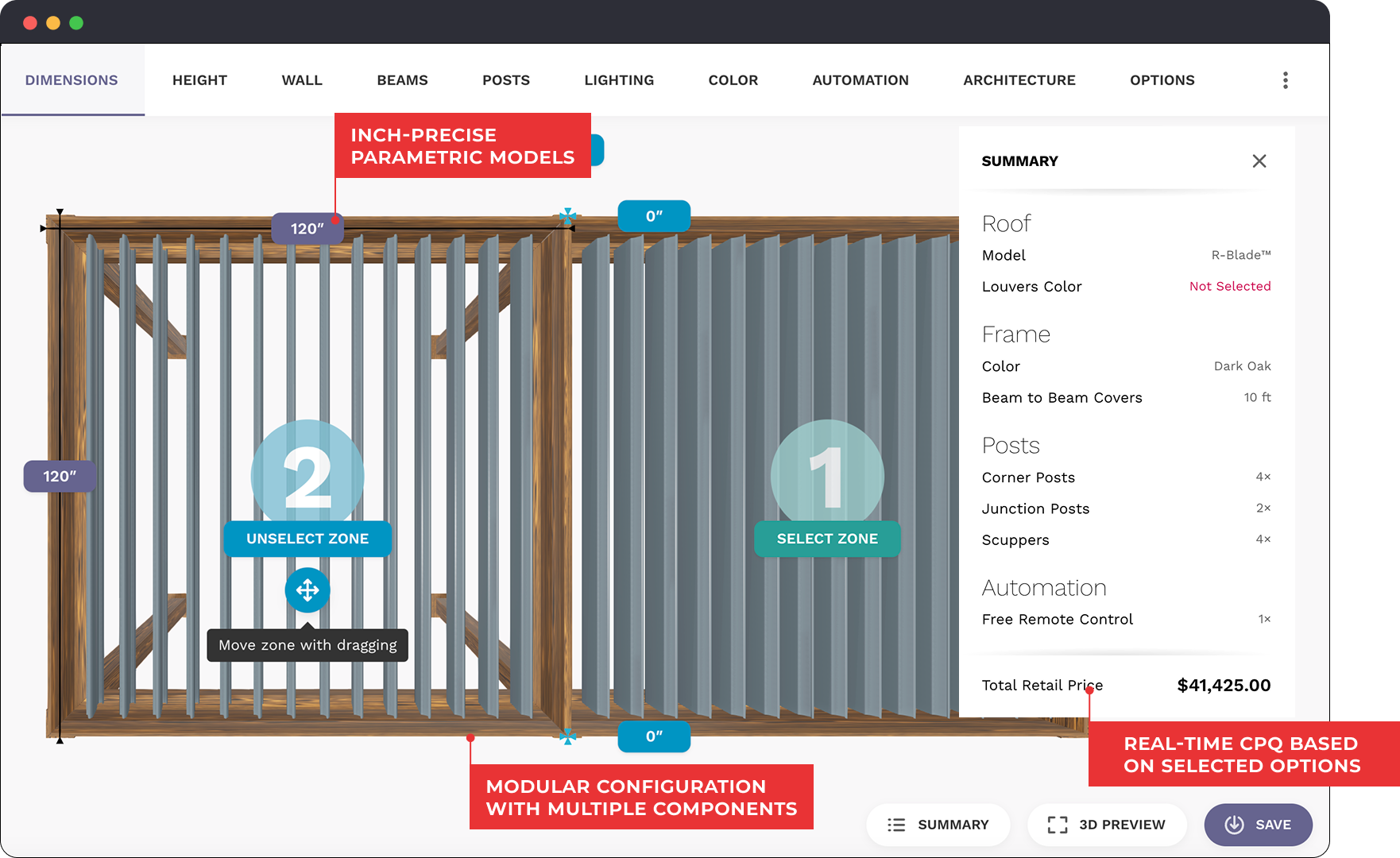
A parametric configurator lets buyers set exact dimensions instead of choosing small, medium, or large. The 3D model, price, and production data all recalculate with each change, down to the millimeter. This fits made-to-order products where fixed SKUs can't cover the real range: countertops, railings, shelving built for a specific wall.
29% of construction companies deal with order errors from misunderstood specs. Parametric configuration prevents a contractor from ordering a railing that physically can't be installed on-site.
Real-world result: KILO, a made-to-measure furniture studio, built its configurator on parametric models connected to CNC production and lowered operational costs by 40%.
| When you need parametric models | When you probably don't |
|---|---|
| Custom dimensions (height, width, depth, angles) | Fixed sizes or preset bundles |
| Structural constraints that change with size | Purely aesthetic customization (color, engraving) |
| High cost of invalid combinations (construction, industrial) | Low-ticket items where returns are cheap |

Modular Product Configuration
Modular configuration covers products built from separate components: sectional sofas, kitchen cabinets, shelving systems, outdoor structures. Buyers place and arrange each piece independently, and the configurator follows your product's connection rules, including which modules can sit next to each other and in what orientation.
Basic platforms handle this with simple if/then option rules. Stronger ones encode the physical relationships between components, so invalid layouts are blocked before they reach production.
Real-world result: Moduline, a modular cabinet manufacturer, reduced manual errors by 90% after implementing modular configuration with full rule enforcement.
Visual CPQ and Dynamic Pricing
Visual CPQ (Configure, Price, Quote) calculates the price as the buyer builds and generates a quote from the finished configuration. Add a module and the price updates. Change the width and the formula recalculates from material area rather than a flat per-unit rate, which static price tables can't do once configurations run into the thousands.
Roughly 1 in 4 companies selling custom products name quoting or manual-process inefficiency as a pain point, the most common one in Salsita's research. When pricing depends on specific people who carry product knowledge in their heads, sales capacity is capped by their availability.
Check that the pricing engine handles dealer tiers, volume discounts, regional pricing, and multiple currencies without separate price lists, and that it supports both add-to-cart and request-a-quote flows.
Real-world result: L'Atelier Paris, a high-end kitchen range brand, moved its showroom sales model online with real-time CPQ and achieved 2–4x faster sales cycles.
Custom Logic for Complex Products
Some products need calculations that no standard rules engine covers. A railing configurator, for example, may need to place posts, handrails, and fixing systems based on site geometry and the chosen materials. This is advanced, domain-specific logic that requires a detailed understanding of the product and usually a good amount of custom code.
Examples of custom logic in configurators:
| Product type | What the logic handles |
|---|---|
| Railings and fencing | Post placement based on site geometry, material-dependent structural rules, code compliance |
| Kitchens and cabinets | Filler pieces between non-standard gaps, appliance clearance rules, plumbing constraints |
| Pergolas and outdoor structures | Load-bearing calculations based on span and material, snow/wind load compliance |
| Modular furniture | Corner module placement rules for L/U-shaped layouts, fabric continuity across connected sections, total dimension calculations |
Configurator Software Integrations: Turning Designs into Production Orders
Configurator software that doesn't connect to your other systems moves manual work downstream instead of removing it. In Salsita's research, 5.8% of companies selling custom products named order errors and misconfigurations as a pain point. Missing integrations make that worse: every manual re-entry between systems is another chance to get the spec wrong.
CAD and BOM Exports for Manufacturing
If your configured orders go straight to a factory floor, the configurator should generate the files your production team works from: BOMs, CAD files (STEP, DXF), cut lists, CNC-ready files, or PDF spec sheets, depending on your workflow.
What to check in the output files:
| Output type | What good looks like |
|---|---|
| BOM (Bill of Materials) | Structured CSV with part numbers, quantities, and materials per component |
| CAD files | STEP or DXF files that open correctly in your CAD software with accurate dimensions |
| Cut lists / CNC files | Ready to feed into your machines without manual adjustments |
| PDF spec sheets | Full configuration summary with visuals, dimensions, and pricing for client sign-off |
Ask during your evaluation call: "Can I download the BOM and CAD files from a live configuration right now and open them in our own tools?"
E-Commerce Integration
An e-commerce integration lets buyers add a configured product to the cart and check out in your existing store, whether it runs on Shopify, WooCommerce, BigCommerce, or a custom platform. For e-commerce and retail companies, this is the entire sales process: there's no follow-up call or showroom visit.
The full configuration (options, dimensions, and price) should travel with the order. Every platform will say yes to "do you integrate with Shopify?" The real question is what data actually reaches your order system.
What to verify:
- Does the full product spec (not just a SKU and total) reach your order management system?
- Do price changes in the configurator sync automatically to the store, or does someone update both?
- Can the buyer complete checkout natively in your store, or does the configurator redirect them to a separate flow?
- Does the integration support your checkout requirements (multi-currency, tax rules, shipping logic)?
ERP and CRM Integrations
If your business runs on systems like Salesforce, SAP, HubSpot, or a custom ERP, your configurator needs to connect to them. The specific integrations depend on your setup, but the goal is always the same: configuration data flows into your existing systems without someone re-entering it.
What to verify for each system type:
| System | What should flow automatically |
|---|---|
| ERP | Full BOM, pricing breakdown, production spec |
| CRM (Salesforce, HubSpot) | Lead data, saved configurations, quote history |
| PIM | Product data syncs both ways. Price or material changes reflect in the configurator. |
Real-world result: Azenco Outdoor, a premium pergola manufacturer, integrated its dealer configurator with Salesforce. The system tracks each lead from first quote to final order, manages dealer access levels, and applies pricing rules automatically. Before this, dealers filled out forms manually, exported PDFs, and sent them to project managers who re-entered the same information. Now dealers configure, price, and submit projects in a single workflow.

Admin Panel and User Management
After launch, your team will add finishes, change prices, and introduce new options. In Salsita's research, roughly 10% of companies were already dealing with a broken, outdated, or previously failed configurator. When a tool can't be updated in-house, every price change becomes a developer ticket and every new material option means weeks of waiting.
An admin panel should let your team manage the full product catalog without developer intervention:
- Product options: available materials, colors, components, and numeric values
- Pricing rules: modifiers, discount structures, dealer-specific tiers
- Configuration constraints: which options are valid together, min/max values
- User roles: separate access and pricing for end buyers, dealers, sales reps, and admins
What to check in the admin panel:
| Capability | What good looks like |
|---|---|
| Price updates | Your team changes a price in a visual editor, live within minutes |
| New materials | Added through the admin UI with texture, pricing, and availability settings |
| Configuration rules | Managed through a visual rule builder with immediate preview |
| User roles | One configurator serves buyers, dealers, reps, and admins with different views and pricing from a single instance |
User roles matter more than most teams realize during evaluation. A single configurator often needs to show retail pricing to end buyers, negotiated margins to dealers, full pricing flexibility to sales reps, and complete catalog control to admins. If the platform requires separate instances for each audience instead of handling this through user management, your maintenance workload multiplies with every audience you serve.

Top 5 Questions to Ask During a Configurator Software Demo
Most demos are designed to show the platform at its best. Your job is to push past the showcase. These five questions reveal the most about whether a configurator will deliver ROI for your business:
1. "Can you demo a product similar to our most complex SKU?"
Ask the provider to configure something closer to your reality: a product with dozens of components, conditional logic between options, or regional pricing differences. If they can't do it live, ask for a proof-of-concept with your actual product data.
2. "Can you show me how pricing changes as the product is configured?"
Start with a configuration where the price depends on more than a simple option or fixed SKU. Change a dimension, add a component, switch materials, or apply a different pricing tier and watch how the price recalculates. If you sell through dealers or across different markets, also ask them to show how dealer pricing, regional pricing, discounts, or currencies are handled.
3. "Walk me through what happens after the buyer clicks 'order.'"
This tests the entire backend pipeline: order data structure, integration handoff, BOM generation, and how the configured spec reaches your production team. If there's a manual step between the configurator output and your ERP, find out exactly what it involves and who does it.
4. "Show me the admin interface. How would a product manager add a new material and update pricing?"
If the demo skips the admin experience, push for it. You want to see the tool your team will use weekly, not just the tool your customers will see.
5. "Can I see the actual BOM and CAD files generated from a live configuration?"
This separates platforms that produce real manufacturing outputs from those that generate a formatted PDF summary. Ask to download the files during the demo and open them in your own CAD software or ERP. A structured BOM with part numbers and quantities that your production team can use directly is a different product from a document that still needs to be re-entered manually.
Where Salsita Fits
Salsita builds interactive 3D configurators for companies selling complex and modular products. The platform covers every feature in this guide: high-fidelity 3D visualization, 3D model interaction, virtual photography, parametric models, modular configuration, visual CPQ, manufacturing outputs, integrations, and a self-service admin panel.
Each implementation is built around the client's own product logic and workflows. Explore live demos, see the full feature set, or book a demo with us using the form below.
Configurator Software FAQ
What is the difference between configurator software and standard CPQ?
Traditional CPQ tools automate pricing and quoting through text-based forms. They work for internal sales teams but aren't built for a visual buyer experience. An interactive 3D configurator adds real-time product visualization on top of CPQ logic, so the buyer sees the product update as they configure it. That increases purchase confidence and reduces order errors. For a full comparison, see Visual CPQ 101.
How do I know if my products need a 3D configurator?
Three questions: Do buyers regularly ask "what will this look like?" before committing? Do misorders cost you rework or returns? Does quoting take more than a few minutes per order? A yes to any of these means a configurator will likely pay for itself. Browse configurator demos by industry to see what's possible for your product type.
Can I build my own configurator with AI or vibe coding tools?
You can prototype one, and the results will look impressive. Current AI models can generate a working 3D configurator demo in a single session. For simple products with limited options and flat pricing, that may be enough to ship. For rule-based products, the comparison isn't platform cost versus zero. It's platform cost versus the ongoing cost of wrong orders reaching your factory, pricing disputes with dealers, and an engineering team maintaining code they didn't write and can't fully audit.

Camille Felappi
Camille is a B2B digital marketing specialist, focusing on SEO and content creation. She helps businesses connect with their target audience using data-driven and creative strategies.
Personalized demo with our VP
Stop Losing Deals to Confusing Catalogs
Book a 30-minute call – bring one product, leave with a working 3D configurator prototype and a clear implementation timeline.



Bring one product link – leave with a clear next step.
































Related Articles

7 Best Zakeke Alternatives in 2026
Zakeke is one of the most popular product customization platforms for ecommerce. But popularity does not mean it is the right fit for every business. This guide compares seven alternatives by features, pricing, and trade-offs.

7 Best 3D Configurators for Manufacturing in 2026
We compared 3D configurators for manufacturing based on what actually matters: parametric modeling, multi-user access, ERP connectivity, CPQ, and manufacturing-ready outputs.

25 Custom Product Sales Statistics You Should Know in 2026
25 custom product sales statistics for 2026, based on Salsita's research across 600+ companies that sell configurable products. See what slows down quoting, what buyers expect, and what sets the winning manufacturers and retailers apart.